Create Text-to-Video Clips with CloudMySite
Use Text to Video when you want CloudMySite to create a short video from a written description. This is the easiest way to make a website hero clip, product moment, social video, service preview, or ad concept.
Create Your First Text Video
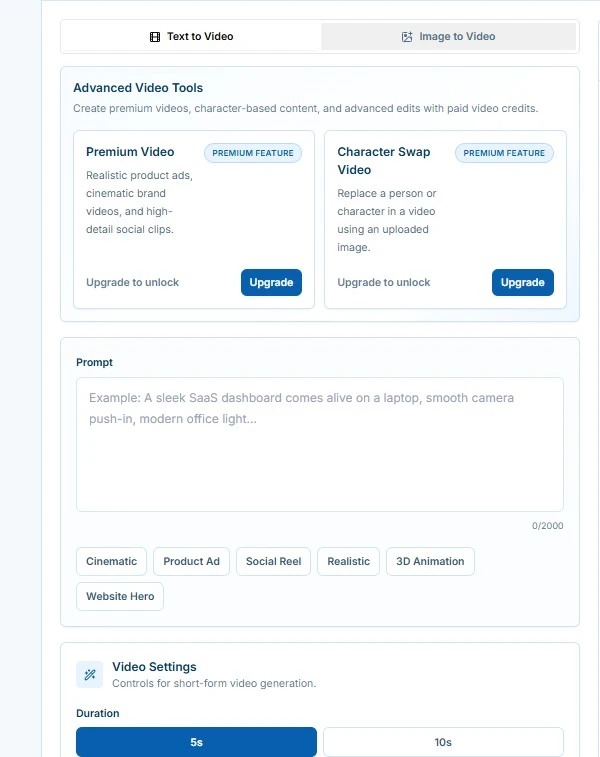
- Open Video Studio.
- Select Text to Video.
- Write a prompt in the Prompt box.
- Choose Duration, Aspect Ratio, Quality, and Motion.
- Review the estimated video credit use.
- Select Generate Video.
- Watch the Preview panel while CloudMySite creates the video.
- When the video is ready, play it in the preview.
- Use Download MP4, Create Variation, Regenerate, or Use in Website when available.
Good Text-to-Video Prompt Formula
Use this simple formula:
Create a [type of video] for [business or project].
Show [main subject or scene].
Use [style, lighting, colors, and mood].
Add [camera movement or motion].
Make it suitable for [where it will be used].
Avoid text unless requested.
Example:
Create a short homepage hero video for a modern accounting firm.
Show a clean desk with a laptop dashboard, organized documents, and soft morning light.
Use a calm professional mood with blue and white brand colors.
Add a slow camera push-in and subtle screen glow.
Make it suitable for a website hero background. Avoid text.
Prompt Examples
Website Hero Video
Create a wide website hero video for a luxury spa.
Show folded towels, candles, warm stone textures, and soft natural light.
Use a peaceful premium mood with gentle camera movement.
Avoid text and keep the center clean for headline copy.
Product Demo Clip
Create a short product video for a reusable water bottle.
Show the bottle on a bright kitchen counter with water droplets and fresh citrus nearby.
Use realistic lighting, clean product photography style, and a slow rotating motion.
Avoid text.
App Preview
Create a short video for a project management app.
Show a laptop dashboard with task cards, calendar blocks, and progress charts coming to life.
Use a polished software demo style, smooth camera push-in, and subtle interface motion.
No readable text.
Local Business Promo
Create a vertical social video for a neighborhood coffee shop.
Show espresso pouring, pastries on a tray, warm morning light, and friendly cafe atmosphere.
Use cozy colors, gentle motion, and an inviting mood.
Avoid text.
Use the Prompt Helpers
Text to Video includes quick helper buttons such as:
- Cinematic
- Product Demo
- Hero Loop
- Social Short
Select one to add useful direction to your prompt. Then add your own business, product, colors, and audience details.
Tips for Better Text Videos
- Describe one clear scene instead of several unrelated scenes.
- Mention where the video will be used, such as homepage hero, product card, or social post.
- Ask for no text if the video will sit behind website text.
- Choose low motion for calm backgrounds.
- Choose medium motion for most website and product videos.
- Choose high motion for energetic social or ad clips.
- Start with 5 seconds before trying longer videos.
- Create a variation when the result is close but not quite right.